Project:
SSL Inspection: Certificate vs Deep Inspection Lab
March 31, 2026
Implementing and comparing certificate inspection and deep inspection in a FortiGate lab environment
Overview
This project is the next step in my home lab and builds on my SSL inspection article, which explores the differences between certificate inspection and deep inspection.
Goals
- Configure certificate inspection
- Test filtering with certificate inspection
- Review certificate inspection traffic visibility
- Configure deep inspection
- Test filtering with deep inspection
- Review deep inspection traffic visibility
Certificate Inspection Configuration
To start, I cloned the built-in certificate-inspection profile in case changes were needed, as the default profile is read-only. I then applied this custom profile, along with the default antivirus and application control profiles, to the firewall policy controlling the test device’s traffic to the WAN.
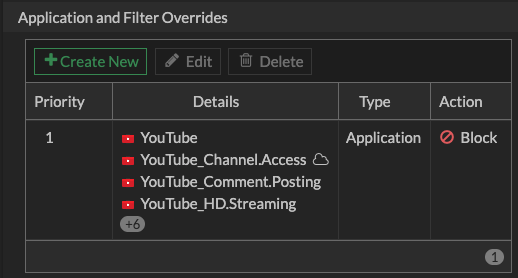
For testing purposes, I also configured the application control profile to block all YouTube applications.
Updating Firewall Policy to Use Certificate Inspection
config firewall policy
  edit 12
      set ssl-ssh-profile "Custom Certificate Inspection"
      set av-profile "default"
      set application-list "default"
  next
end
Once i had finished testing certificate inspection, i updated that same policy to now use deep inspection.
Updating Firewall Policy to Use Deep Inspection
config firewall policy
  edit 12
      set ssl-ssh-profile "Custom Deep Inspection"
      set av-profile "default"
      set application-list "default"
  next
end
Testing
To evaluate the differences between certificate inspection and deep inspection, I tested file inspection, application access, and firewall log visibility.
File Inspection
To test how each inspection method handles file contents, I attempted to download the EICAR test file over HTTPS.
Certificate Inspection
With certificate inspection enabled, the download completed successfully and was not blocked by the FortiGate antivirus profile (although it was flagged by the browser and operating system).
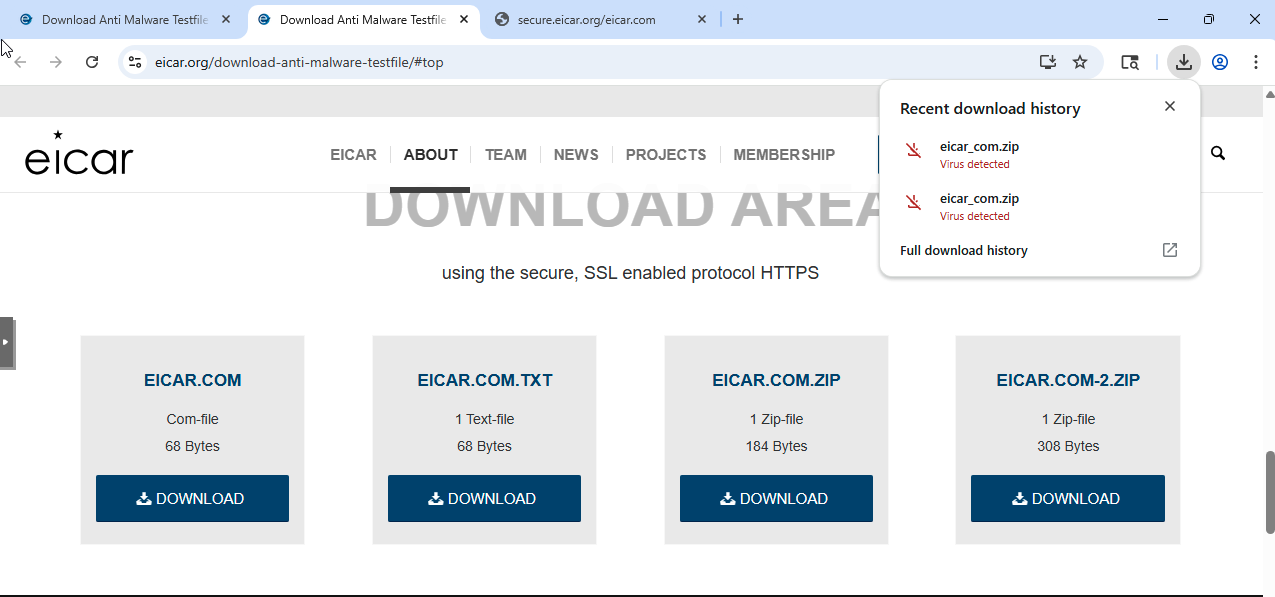
This is expected behavior. Certificate inspection does not decrypt traffic, so while the firewall can identify the destination using SNI, it does not have visibility into the file contents. As a result, antivirus and other payload-based security controls are not effective in this mode.
Deep Inspection
With deep inspection enabled, the file was not downloaded. Instead, the request was intercepted, and I received a FortiGate block message indicating the file was malicious.
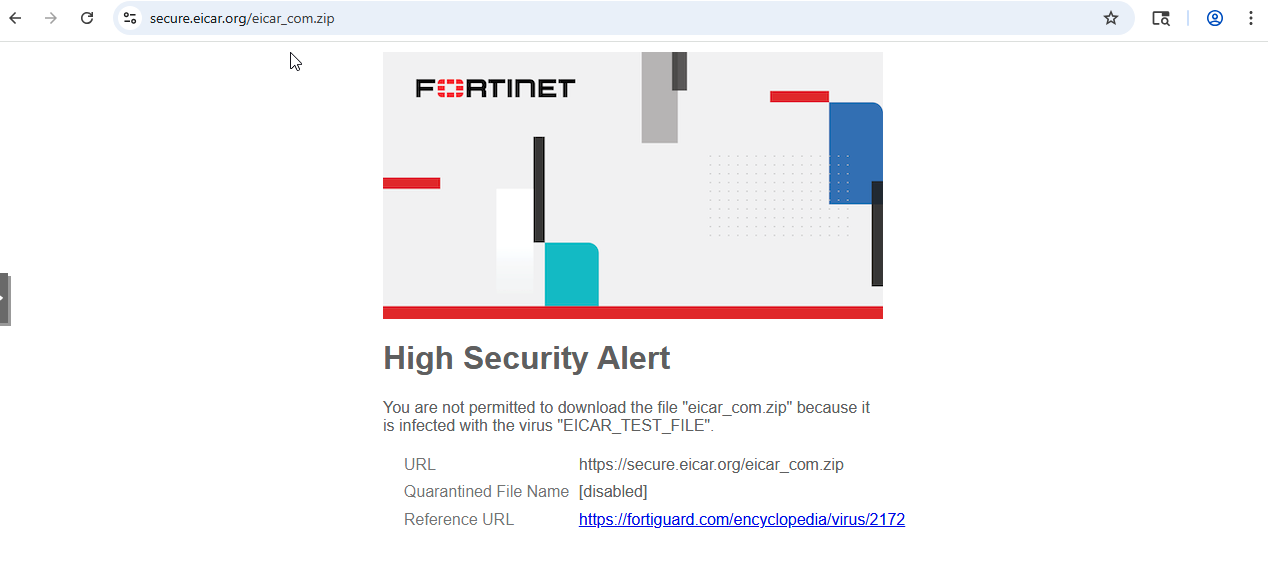
What stood out here is how immediate the difference was. With certificate inspection, the firewall had no awareness of the file itself, while with deep inspection enabled, the same request was intercepted and evaluated in real time.
This made it very clear that many security features, such as antivirus and file inspection, are entirely dependent on having visibility into the payload.
Application Access
To test application control, I configured the application control profile to block all YouTube applications.
Certificate Inspection
When testing application control with certificate inspection, I observed inconsistent behavior when accessing YouTube.
Navigating directly to https://youtube.com resulted in the page loading with an “offline” message, indicating that key components of the site were being blocked.
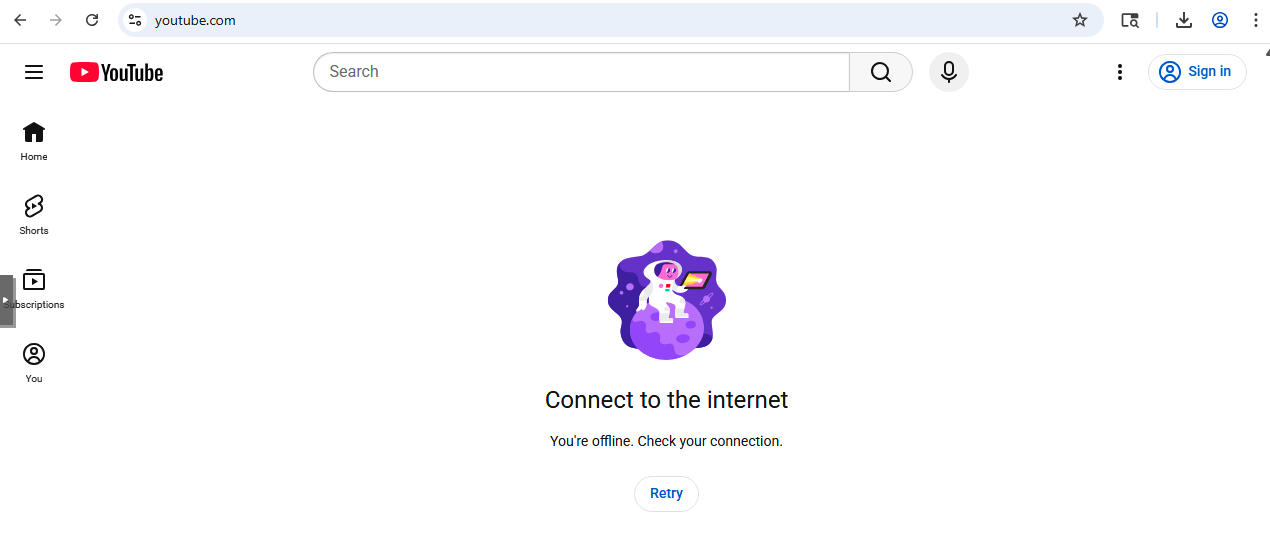
Accessing YouTube through Google search results or navigating directly to video URLs resulted in failed page loads or playback errors.
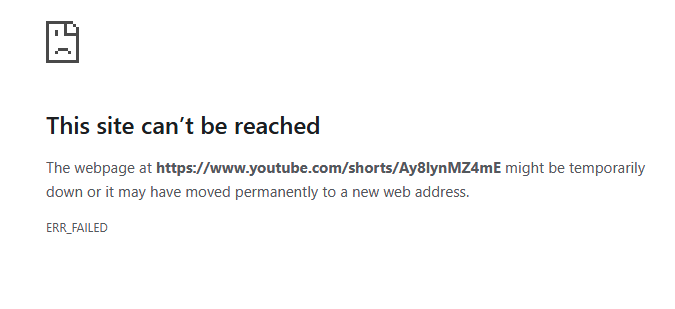
This suggests that while application control can identify and block core YouTube traffic using SNI, some supporting connections may still be allowed. As a result, the site may partially load, but key functionality such as video playback is prevented, or the site fails to load entirely.
This was one of the first moments where the limitations of certificate inspection became very noticeable. While the firewall could clearly identify the application, enforcement felt inconsistent from a user perspective because it was based only on domain-level visibility rather than full application behavior.
Deep Inspection
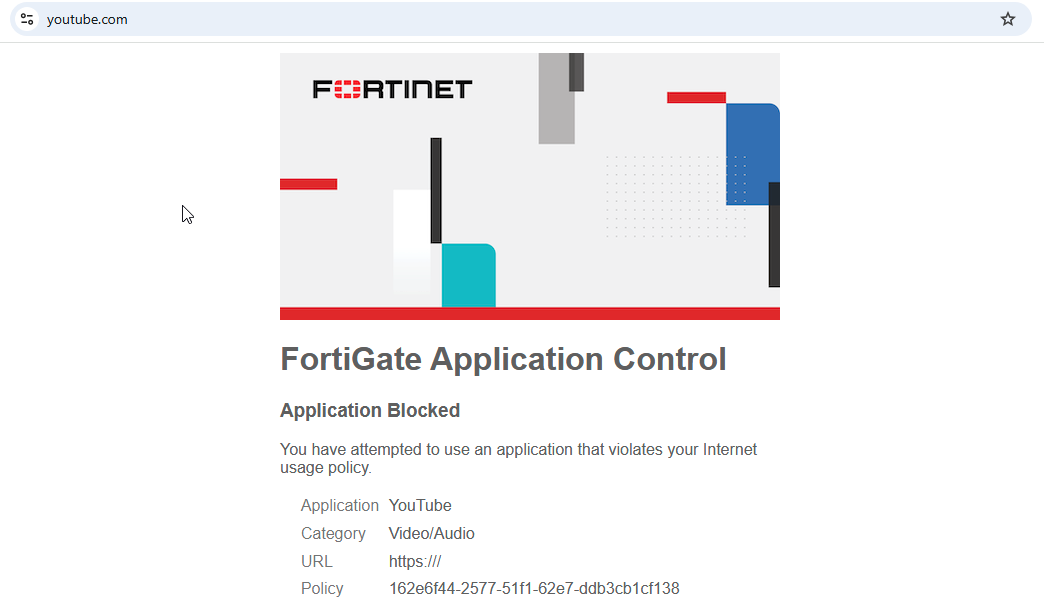
With deep inspection enabled and the same application control profile applied, the behavior became consistent. Instead of partial loading, a FortiGate block page was displayed when attempting to access YouTube or individual videos.
Firewall Logs and Visibility
This section compares the data available in firewall logs when using certificate inspection versus deep inspection.
Certificate Inspection
When reviewing the logs, I was able to observe domain-level visibility even without decrypting traffic. In the example below, the firewall identifies YouTube traffic and blocks it using application control:
- hostname="www.youtube.com"
- app="YouTube"
- action="block"
- url="/"
The hostname field is derived from the TLS handshake (SNI), which allows the firewall to determine the destination without decrypting the payload. However, only the root URL ("/") is visible, and no additional path or content information is available.
This highlights one of the key limitations of certificate inspection—it provides enough visibility for application identification, but not full insight into the contents of the traffic.
Certificate Inspection App Control Logs
date=2026-03-29 time=20:05:29 eventtime=1774839928518587488 tz="-0700" logid="1059028704" type="utm" subtype="app-ctrl" eventtype="signature" level="information" vd="root" appid=15895 srcip=10.10.40.200 srccountry="Reserved" dstip=142.251.34.78 dstcountry="United States" srcport=50924 dstport=443 srcintf="Clients" srcintfrole="lan" dstintf="wan1" dstintfrole="wan" proto=6 service="HTTPS" direction="outgoing" policyid=12 poluuid="162e6f44-2577-51f1-62e7-ddb3cb1cf138" policytype="policy" sessionid=19060799 applist="default" action="pass" appcat="Network.Service" app="SSL" incidentserialno=7348792 msg="Network.Service: SSL" apprisk="elevated"

date=2026-03-29 time=20:05:29 eventtime=1774839928518897348 tz="-0700" logid="1059028705" type="utm" subtype="app-ctrl" eventtype="signature" level="warning" vd="root" appid=31077 srcip=10.10.40.200 srccountry="Reserved" dstip=142.251.34.78 dstcountry="United States" srcport=50924 dstport=443 srcintf="Clients" srcintfrole="lan" dstintf="wan1" dstintfrole="wan" proto=6 service="SSL" direction="outgoing" policyid=12 poluuid="162e6f44-2577-51f1-62e7-ddb3cb1cf138" policytype="policy" sessionid=19060799 applist="default" action="block" appcat="Video/Audio" app="YouTube" hostname="www.youtube.com" incidentserialno=7348793 url="/" msg="Video/Audio: YouTube" apprisk="elevated"

date=2026-03-29 time=20:05:29 eventtime=1774839928518974208 tz="-0700" logid="1059028705" type="utm" subtype="app-ctrl" eventtype="signature" level="warning" vd="root" appid=31077 srcip=10.10.40.200 srccountry="Reserved" dstip=142.251.34.78 dstcountry="United States" srcport=50924 dstport=443 srcintf="Clients" srcintfrole="lan" dstintf="wan1" dstintfrole="wan" proto=6 service="SSL" direction="outgoing" policyid=12 poluuid="162e6f44-2577-51f1-62e7-ddb3cb1cf138" policytype="policy" sessionid=19060799 applist="default" action="block" appcat="Video/Audio" app="YouTube" hostname="www.youtube.com" incidentserialno=7348794 url="/" msg="Video/Audio: YouTube" apprisk="elevated"
Deep Inspection
When reviewing logs generated with deep inspection enabled, I initially expected to see more detailed information, including full URLs. However, this was not immediately the case.
Deep Inspection Application Control Log with Youtube Blocked
date=2026-03-30 time=19:20:08 eventtime=1774923608621295720 tz="-0700" logid="1059028704" type="utm" subtype="app-ctrl" eventtype="signature" level="information" vd="root" appid=15895 srcip=10.10.40.200 srccountry="Reserved" dstip=142.251.218.14 dstcountry="United States" srcport=53821 dstport=443 srcintf="Clients" srcintfrole="lan" dstintf="wan1" dstintfrole="wan" proto=6 service="HTTPS" direction="outgoing" policyid=12 poluuid="162e6f44-2577-51f1-62e7-ddb3cb1cf138" policytype="policy" sessionid=35890 applist="default" action="pass" appcat="Network.Service" app="SSL" incidentserialno=243272441 msg="Network.Service: SSL" apprisk="elevated"

date=2026-03-30 time=19:20:08 eventtime=1774923608621759140 tz="-0700" logid="1059028705" type="utm" subtype="app-ctrl" eventtype="signature" level="warning" vd="root" appid=31077 srcip=10.10.40.200 srccountry="Reserved" dstip=142.251.218.14 dstcountry="United States" srcport=53821 dstport=443 srcintf="Clients" srcintfrole="lan" dstintf="wan1" dstintfrole="wan" proto=6 service="SSL" direction="outgoing" policyid=12 poluuid="162e6f44-2577-51f1-62e7-ddb3cb1cf138" policytype="policy" sessionid=35890 applist="default" action="block" appcat="Video/Audio" app="YouTube" hostname="www.youtube.com" incidentserialno=243272442 url="/" msg="Video/Audio: YouTube" apprisk="elevated"

date=2026-03-30 time=19:20:08 eventtime=1774923608621949440 tz="-0700" logid="1059028705" type="utm" subtype="app-ctrl" eventtype="signature" level="warning" vd="root" appid=31077 srcip=10.10.40.200 srccountry="Reserved" dstip=142.251.218.14 dstcountry="United States" srcport=53821 dstport=443 srcintf="Clients" srcintfrole="lan" dstintf="wan1" dstintfrole="wan" proto=6 service="SSL" direction="outgoing" policyid=12 poluuid="162e6f44-2577-51f1-62e7-ddb3cb1cf138" policytype="policy" sessionid=35890 applist="default" action="block" appcat="Video/Audio" app="YouTube" hostname="www.youtube.com" incidentserialno=243272443 url="/" msg="Video/Audio: YouTube" apprisk="elevated"
After further testing, I modified the application control profile so that YouTube itself was allowed, while video playback was still blocked.
This ended up being one of the more interesting parts of the project. I initially assumed that enabling deep inspection would automatically provide full visibility, but that was not the case.
Instead, it became clear that inspection and visibility are not the same thing. Deep inspection allows the firewall to decrypt traffic, but whether or not that data is actually logged depends on how the session is handled and which security profiles are actively processing it.
Deep Inspection Application Control Log with Youtube partially permitted
date=2026-03-30 time=20:01:15 eventtime=1774926075326317140 tz="-0700" logid="1059028704" type="utm" subtype="app-ctrl" eventtype="signature" level="information" vd="root" appid=15895 srcip=10.10.40.200 srccountry="Reserved" dstip=142.251.215.206 dstcountry="United States" srcport=53592 dstport=443 srcintf="Clients" srcintfrole="lan" dstintf="wan1" dstintfrole="wan" proto=6 service="HTTPS" direction="outgoing" policyid=12 poluuid="162e6f44-2577-51f1-62e7-ddb3cb1cf138" policytype="policy" sessionid=40980 applist="default" action="pass" appcat="Network.Service" app="SSL" incidentserialno=243273550 msg="Network.Service: SSL" apprisk="elevated"

date=2026-03-30 time=20:01:15 eventtime=1774926075341457240 tz="-0700" logid="1059028704" type="utm" subtype="app-ctrl" eventtype="signature" level="information" vd="root" appid=31077 srcip=10.10.40.200 srccountry="Reserved" dstip=142.251.215.206 dstcountry="United States" srcport=53592 dstport=443 srcintf="Clients" srcintfrole="lan" dstintf="wan1" dstintfrole="wan" proto=6 service="SSL" direction="outgoing" policyid=12 poluuid="162e6f44-2577-51f1-62e7-ddb3cb1cf138" policytype="policy" sessionid=40980 applist="default" action="pass" appcat="Video/Audio" app="YouTube" hostname="www.youtube.com" incidentserialno=243273551 url="/" msg="Video/Audio: YouTube" apprisk="elevated" scertcname="*.google.com"

date=2026-03-30 time=20:01:28 eventtime=1774926088573699525 tz="-0700" logid="1059028705" type="utm" subtype="app-ctrl" eventtype="signature" level="warning" vd="root" appid=16420 srcip=10.10.40.200 srccountry="Reserved" dstip=142.251.215.206 dstcountry="United States" srcport=53592 dstport=443 srcintf="Clients" srcintfrole="lan" dstintf="wan1" dstintfrole="wan" proto=6 service="HTTPS" direction="outgoing" policyid=12 poluuid="162e6f44-2577-51f1-62e7-ddb3cb1cf138" policytype="policy" sessionid=40980 applist="default" action="block" appcat="Video/Audio" app="YouTube_Video.Access" hostname="www.youtube.com" incidentserialno=243273553 url="/watch?v=dQw4w9WgXcQ" agent="Mozilla/5.0 (Windows NT 10.0; Win64; x64) AppleWebKit/537.36 (KHTML, like Gecko) Chrome/146.0.0.0 Safari/537.36" httpmethod="GET" msg="Video/Audio: YouTube_Video.Access" apprisk="elevated"
Deep Inspection Web Filter Log
date=2026-03-30 time=20:01:15 eventtime=1774926075342321780 tz="-0700" logid="0319013317" type="utm" subtype="webfilter" eventtype="urlmonitor" level="notice" vd="root" policyid=12 poluuid="162e6f44-2577-51f1-62e7-ddb3cb1cf138" policytype="policy" sessionid=40980 srcip=10.10.40.200 srcport=53592 srccountry="Reserved" srcintf="Clients" srcintfrole="lan" srcuuid="b60a35f0-256f-51f1-45a5-19f989067296" dstip=142.251.215.206 dstport=443 dstcountry="United States" dstintf="wan1" dstintfrole="wan" dstuuid="abcdaad6-27cd-51f0-08ca-d23947e5786b" proto=6 httpmethod="GET" service="HTTPS" hostname="www.youtube.com" agent="Mozilla/5.0 (Windows NT 10.0; Win64; x64) AppleWebKit/537.36 (KH" profile="default" action="passthrough" reqtype="referral" url="https://www.youtube.com/favicon.ico" referralurl="https://www.youtube.com/watch?v=dQw4w9WgXcQ" sentbyte=3107 rcvdbyte=376 direction="outgoing" msg="URL has been visited" ratemethod="domain" cat=255 catdesc="Unknown"

date=2026-03-30 time=20:01:28 eventtime=1774926088573477834 tz="-0700" logid="0319013317" type="utm" subtype="webfilter" eventtype="urlmonitor" level="notice" vd="root" policyid=12 poluuid="162e6f44-2577-51f1-62e7-ddb3cb1cf138" policytype="policy" sessionid=40980 srcip=10.10.40.200 srcport=53592 srccountry="Reserved" srcintf="Clients" srcintfrole="lan" srcuuid="b60a35f0-256f-51f1-45a5-19f989067296" dstip=142.251.215.206 dstport=443 dstcountry="United States" dstintf="wan1" dstintfrole="wan" dstuuid="abcdaad6-27cd-51f0-08ca-d23947e5786b" proto=6 httpmethod="GET" service="HTTPS" hostname="www.youtube.com" agent="Mozilla/5.0 (Windows NT 10.0; Win64; x64) AppleWebKit/537.36 (KH" profile="default" action="passthrough" reqtype="direct" url="https://www.youtube.com/watch?v=dQw4w9WgXcQ" sentbyte=3614 rcvdbyte=2042 direction="outgoing" msg="URL has been visited" ratemethod="domain" cat=255 catdesc="Unknown"
After this change, I began to see full URL visibility in the logs. I also enabled web filtering for additional testing. While web filter logs showed full URLs, application control logs still depended on how the session was handled.
Key Observation
When YouTube was fully blocked, the session was terminated early based on SNI. Because the session never fully established, no HTTP request was generated, and only domain-level visibility was available in the logs.
After allowing the session to establish (while still blocking video playback), the firewall was able to observe and log the full HTTP request, including:
- url="/watch?v=..."
This demonstrates that full URL visibility depends not only on decryption, but also on allowing the session to progress far enough for HTTP data to be generated and parsed.
Certificate Behavior Before and After CA Installation
This section compares certificate behavior between certificate inspection and deep inspection.
Certificate Inspection
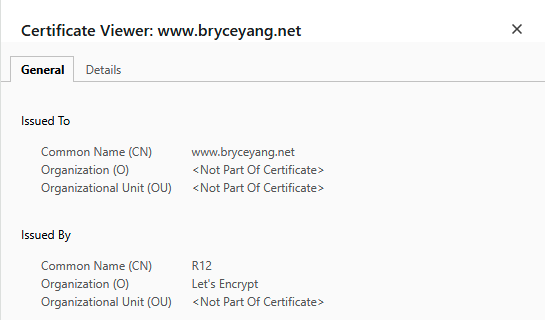
With certificate inspection enabled, certificate behavior remained unchanged. When accessing bryceyang.net, the certificate was still signed by Let’s Encrypt.
Deep Inspection
With deep inspection enabled, certificate behavior changed.
Before installing the FortiGate CA certificate on the client, browser warnings were presented due to the untrusted certificate.
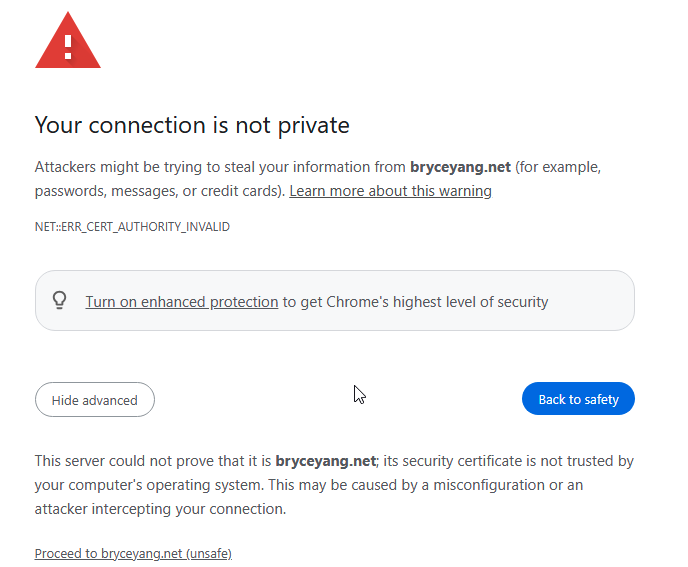
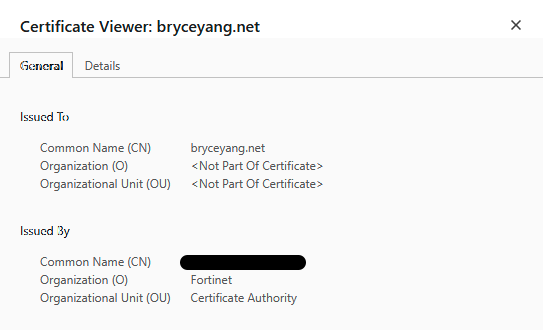
After installing the certificate, the connection proceeded normally. When viewing the certificate, it was now signed by the FortiGate, demonstrating certificate re-signing in action.
Key Takeaways
One of the biggest takeaways from this project is that things rarely work as expected on the first attempt.
While implementing deep inspection, I initially encountered an issue where traffic was not being re-signed, despite the configuration appearing correct. I verified policy behavior, SSL profiles, and security profiles, disabled hardware offloading, and tested across multiple devices, but the issue persisted.
Ultimately, the problem was resolved by updating the FortiGate firmware. Once updated, deep inspection began functioning as expected. This reinforces the importance of running stable firmware versions, as platform-level issues can lead to unnecessary troubleshooting.
From a visibility perspective, I was also surprised by how limited the logs were by default, particularly the lack of URL visibility.
Even with deep inspection enabled, full URL visibility was not immediately available. It was only after modifying application control behavior to allow sessions to fully establish that full URLs began to appear. Enabling extended logging on both the application control and web filter profiles provided additional clarity.
This led to an important realization:
Visibility depends not just on decryption, but on how far the session is allowed to progress and how logging is configured.
When the session was being blocked early, application control was able to identify and block traffic based solely on the hostname, without needing full URL visibility.
Closing Thoughts
Going into this project, I expected SSL inspection to be relatively straightforward—enable the feature, apply it to a policy, and observe the results. In reality, it turned out to be much more nuanced.
What stood out the most is how many moving parts are involved. SSL inspection itself is only one piece of the puzzle. Policy behavior, application control decisions, logging settings, and even firmware versions all influence how traffic is handled and what visibility you actually gain.
This project helped reinforce that visibility is not just about decrypting traffic—it is about allowing sessions to progress far enough for meaningful data to be generated, and ensuring the firewall is configured to capture that data effectively.
Overall, this was a great exercise in understanding not just how SSL inspection works, but how it behaves in practice. It gave me a much better appreciation for the trade-offs between visibility, control, and complexity, and it is something I will continue to build on in future projects.