Project:
Building a Home Lab Foundation
March 22, 2026
Designing a segmented home lab to create a practical foundation for network architecture, security controls, monitoring, and future projects.
Overview
This project documents the design and implementation of my segmented home lab environment. My goal was to build a practical space for testing network architecture, segmentation, firewall policy, and monitoring in a controlled setting.
Rather than placing every device on a flat network, I built the lab around separate management, server, DMZ, client, and IoT segments. The goal was not just better isolation, but to make the lab feel more like a real environment where trust boundaries matter and traffic should be intentional rather than assumed.
More than anything, this project is a foundation. Future work around monitoring, identity, remote access, and security controls all depends on having an environment that is segmented, observable, and designed with some structure from the start.
Goals
- Separate infrastructure, servers, clients, and lower-trust devices
- Control inter-VLAN traffic instead of relying on broad internal access
- Support core internal services such as Active Directory and security monitoring
- Create a foundation for future projects involving visibility, remote access, and security testing
Design Approach
When building out the lab, I wanted the network to reflect trust boundaries rather than convenience. Each segment was created with a specific purpose in mind, and the underlying hardware was designed to support that structure instead of working around it.
At the center of the environment is a FortiGate acting as the Layer 3 boundary between segments. By terminating gateways at the firewall and extending those networks across the switching environment, inter-segment traffic could be inspected and controlled through policy rather than allowed implicitly. That made the lab more useful than a simple connectivity exercise. It created a platform for defining which systems should communicate, over which services, and under what conditions.
The environment is built on a FortiGate, FortiSwitch, and FortiAP. Using FortiLink allowed the switching and wireless layers to stay under the same management plane, which made the lab feel more cohesive and closer to a real deployment than a collection of separately managed devices. I also adjusted the FortiLink design to use a redundant LAG between the FortiGate and FortiSwitch, giving the access layer a stronger foundation from the start.
That same design extended segmentation beyond the firewall itself. The FortiSwitch carries the VLANs defined on the FortiGate to wired systems, while the FortiAP places wireless devices into the appropriate segments through SSID design. This kept the lab aligned to the same policy model across both wired and wireless access.
VLAN 10 - Management
- Used for management-plane systems such as the Proxmox hypervisor and network infrastructure
VLAN 20 - Servers
- Hosts internal services such as the domain controller and Wazuh
VLAN 30 - DMZ
- Used for workloads that are intentionally more exposed, such as the Minecraft server
VLAN 40 - Clients
- Contains test endpoints such as Windows 11 and Ubuntu systems
VLAN 50 - IoT
- Reserved for lower-trust devices such as phones and gaming systems, with wireless access extended through a bridged SSID
Lab Diagram
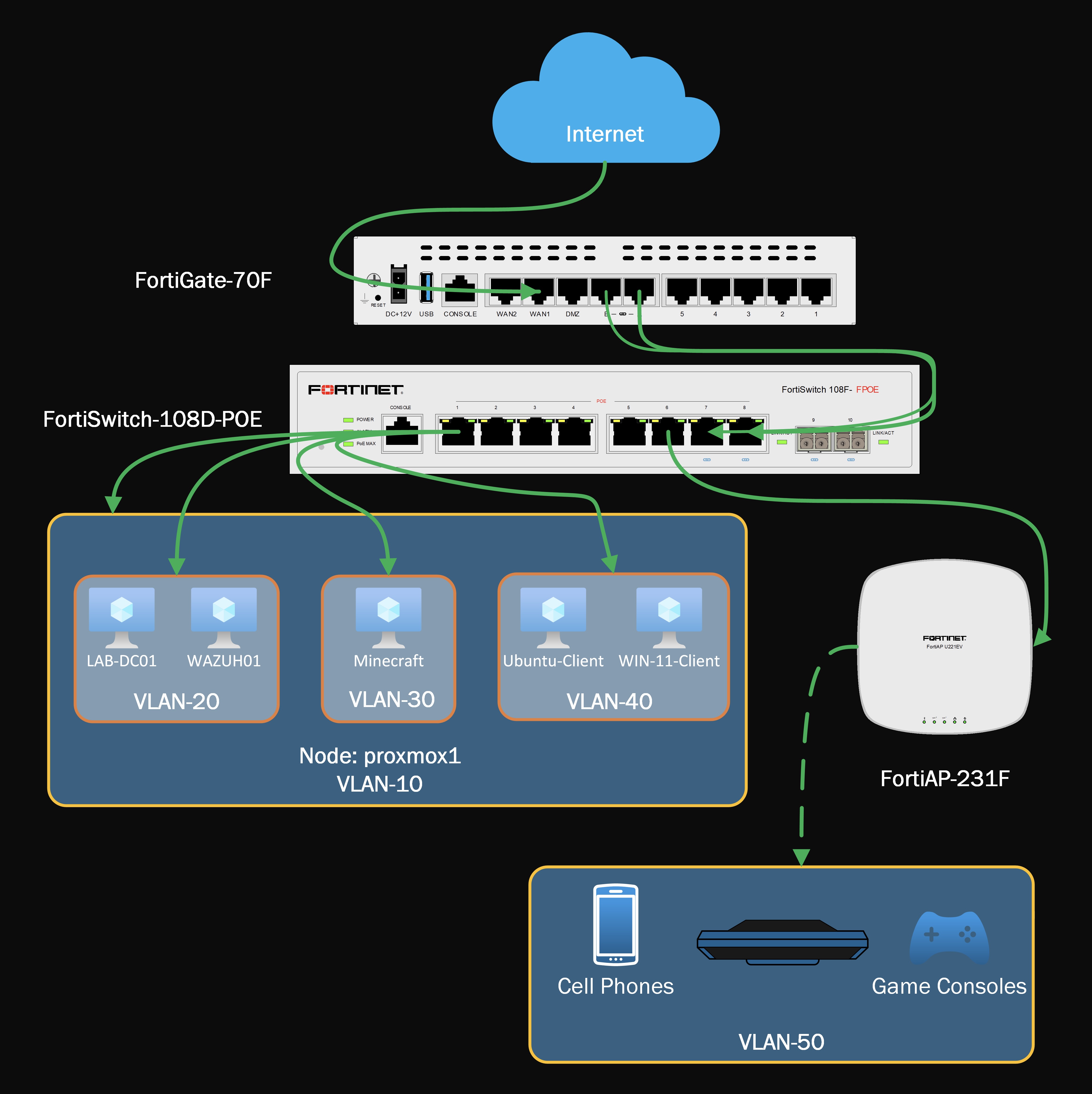
This layout shows how the firewall, switching, and wireless layers work together to extend segmentation across the lab.
Implementation
VLAN Creation
The first step was creating the Layer 3 interfaces for each segment on the FortiGate. These interfaces established the gateways for each subnet and turned the logical design into something the lab could actually enforce.
From a design standpoint, this was the point where the environment stopped feeling like a collection of systems and started feeling like an actual network. Once those boundaries existed, policy could be built around trust levels and service requirements rather than broad internal reachability.
VLAN Interface Configuration
config system interface
  edit "Management"
      set vdom "root"
      set ip 10.10.10.1 255.255.255.0
      set allowaccess ping https fabric
      set alias "VLAN-10"
      set interface "fortilink"
      set vlanid 10
  next
  edit "Servers"
      set vdom "root"
      set ip 10.10.20.1 255.255.255.0
      set allowaccess ping
      set alias "VLAN-20"
      set interface "fortilink"
      set vlanid 20
  next
  edit "DMZ"
      set vdom "root"
      set ip 10.10.30.1 255.255.255.0
      set alias "VLAN-30"
      set interface "fortilink"
      set switch-controller-access-vlan enable
      set vlanid 30
  next
  edit "Clients"
      set vdom "root"
      set ip 10.10.40.1 255.255.255.0
      set allowaccess ping
      set alias "VLAN-40"
      set interface "fortilink"
      set vlanid 40
  next
  edit "IoT"
      set vdom "root"
      set ip 10.10.50.1 255.255.255.0
      set alias "VLAN-50"
      set interface "fortilink"
      set vlanid 50
  next
end
Service Objects
After segmentation was in place, I created custom firewall service objects to support only the traffic that was required between systems.
For Active Directory, I defined the core services needed for client communication with the domain controller and grouped them under AD_Core_Services. These included DNS, Kerberos, LDAP, SMB, Global Catalog, and the dynamic RPC range required for domain functionality.
I also created dedicated Wazuh service objects for client enrollment and log forwarding, then grouped them under WAZUH. This allowed both client systems and the DMZ-hosted Minecraft server to communicate with the Wazuh server without burying that traffic inside broad allow rules.
Custom Service Objects
config firewall service custom
  edit "DCE-RPC"
      set tcp-portrange 135
      set udp-portrange 135
  next
  edit "DNS"
      set tcp-portrange 53
      set udp-portrange 53
  next
  edit "KERBEROS"
      set tcp-portrange 88 464
      set udp-portrange 88 464
  next
  edit "LDAP"
      set tcp-portrange 389
  next
  edit "LDAP_UDP"
      set udp-portrange 389
  next
  edit "NTP"
      set tcp-portrange 123
      set udp-portrange 123
  next
  edit "SAMBA"
      set tcp-portrange 139
  next
  edit "SMB"
      set tcp-portrange 445
  next
  edit "Global-Catalog"
      set tcp-portrange 3268
  next
  edit "AD-Dynamic-RPC"
      set tcp-portrange 49152-65535
  next
  edit "WAZUH-EVENTS"
      set tcp-portrange 1514
  next
  edit "WAZUH-ENROLLMENT"
      set tcp-portrange 1515
  next
end
Firewall Policies
With the VLANs and service objects in place, I built firewall policies to enforce the intended communication paths.
Each VLAN was given controlled outbound access to the WAN. More importantly, internal east-west communication was limited to specific needs inside the lab, while inbound exposure was restricted to the one service that was intentionally published from the DMZ.
- Clients were allowed to reach the domain controller only for required Active Directory services
- Clients were allowed to communicate with Wazuh only for monitoring and enrollment traffic
- The Minecraft host in the DMZ was allowed to forward logs to Wazuh without broader access into the server network
- Inbound WAN access was limited to the published Minecraft service hosted in the DMZ
This kept the environment aligned to a least-privilege model. Internal traffic was not trusted by default simply because it originated inside the lab, and external access was not granted beyond the specific service I intended to expose. Traffic was allowed only where there was a defined operational reason.
Representative Firewall Policies
config firewall policy
  edit 5
      set name "Management to WAN"
      set srcintf "Management"
      set dstintf "wan1"
      set action accept
      set srcaddr "Management address"
      set dstaddr "all"
      set schedule "always"
      set service "ALL"
      set ssl-ssh-profile "certificate-inspection"
      set logtraffic all
      set nat enable
  next
  edit 7
      set name "Minecraft Inbound"
      set srcintf "wan1"
      set dstintf "DMZ"
      set action accept
      set srcaddr "USA"
      set dstaddr "Minecraft-VIP"
      set schedule "always"
      set service "Minecraft"
      set ssl-ssh-profile "certificate-inspection"
      set logtraffic all
  next
  edit 14
      set name "Clients to LAB-DC01 AD_Core"
      set srcintf "Clients"
      set dstintf "Servers"
      set action accept
      set srcaddr "Clients address"
      set dstaddr "LAB-DC01"
      set schedule "always"
      set service "AD_Core_Services"
      set ssl-ssh-profile "certificate-inspection"
      set logtraffic all
      set nat enable
  next
  edit 15
      set name "Clients to LAB-DC01 RPC_Dynamic"
      set srcintf "Clients"
      set dstintf "Servers"
      set action accept
      set srcaddr "Clients address"
      set dstaddr "LAB-DC01"
      set schedule "always"
      set service "AD-Dynamic-RPC"
      set ssl-ssh-profile "certificate-inspection"
      set logtraffic all
      set nat enable
  next
  edit 16
      set name "Clients to WAZUH01"
      set srcintf "Clients"
      set dstintf "Servers"
      set action accept
      set srcaddr "Clients address"
      set dstaddr "WAZUH01"
      set schedule "always"
      set service "WAZUH"
      set ssl-ssh-profile "certificate-inspection"
      set logtraffic all
      set nat enable
  next
  edit 17
      set name "Minecraft-Host to WAZUH01"
      set srcintf "DMZ"
      set dstintf "Servers"
      set action accept
      set srcaddr "Minecraft-Host"
      set dstaddr "WAZUH01"
      set schedule "always"
      set service "WAZUH"
      set ssl-ssh-profile "certificate-inspection"
      set logtraffic all
      set nat enable
  next
end
Security Decisions
A large part of the value in this project was not the number of VLANs I created, but the reasoning behind them.
Separating management from clients reduces the chance that routine endpoint activity can reach administrative systems directly. Isolating servers from client networks makes service access easier to understand and control. Placing the Minecraft server in the DMZ acknowledges that some workloads carry a different risk profile and should not sit alongside core internal services. Segmenting IoT devices recognizes that convenience devices often deserve the least trust of all.
Taken together, these choices make the lab more realistic and more useful. They also create a better platform for future testing because new controls can be evaluated inside defined boundaries rather than dropped into a flat network.
Why This Project Matters
This project is less about any one service and more about creating structure.
It gives me a place to test firewall policy changes without collapsing everything into a single subnet. It makes monitoring and log forwarding more meaningful because traffic paths are intentional. It also creates the conditions for future projects to be framed in a way that mirrors real environments.
A monitoring project matters more when the monitored systems live in distinct trust zones. A ZTNA or remote access project matters more when access is being granted into a segmented environment instead of an open internal network. Even identity and hardening work become easier to explain once the surrounding architecture is already defined.
That is why I see this as a foundational project rather than a one-off build.
Validation
At this stage, the lab has established the baseline network structure needed for future expansion.
The current implementation provides:
- Isolated VLANs for key device groups
- Layer 3 segmentation enforced at the firewall
- Controlled access from clients to core domain services
- Log forwarding paths to Wazuh from approved systems
- A DMZ segment for more exposed workloads
- Verified access to the Minecraft server, which remains essential lab infrastructure
As the lab continues to grow, this baseline will make it easier to test additional controls without rebuilding the network each time.
Next Steps
This project lays the groundwork for the next phase of the lab. Areas I plan to build on include:
- Expanding monitoring and alerting visibility
- Testing additional security controls and segmentation policies
- Evaluating remote access and Zero Trust approaches
- Adding more systems and services to better simulate production-style dependencies
Closing Thoughts
Good lab environments do more than host virtual machines. They create a place where design decisions can be tested, challenged, and improved over time.
For me, this project was the first step in building that kind of environment. It established the network boundaries, service paths, and policy structure that later projects will depend on. The lab will continue evolving, but the core value of this stage was creating a foundation that makes the rest of that work possible. If anyone from Fortinet happens to read this, I would also accept additional hardware in support of further research.